


Have you ever opened your inbox, coffee in hand, only to find a “Thank You for Your Order!” email from a place called Bestshoesevershop? Your heart skips a beat. You didn’t buy any shoes. Did someone steal your credit card? Was there a late-night Ambien-fueled shopping spree you don’t remember?
- The Mystery of the “Bestshoesevershop” Order Confirmation
- Why This Specific Email is Popping Up Everywhere
- What Does a Typical “Bestshoesevershop Email Confirmation Look Like?
- Is Bestshoesevershop a Real Store?
- How to Spot a Fake Order Confirmation Email
- Why Scammers Use the “Order Confirmation” Tactic
- Step-by-Step: What to Do If You Receive This Email
- Step 1: Don’t Click Anything
- Step 2: Check Your Financial Statements Directly
- Step 3: Report and Block
- What If You Already Clicked the Link?
- Conclusion: Staying One Step Ahead of the Bots
Before you dive into a panic-driven clicking frenzy, take a deep breath. You are likely looking at one of the most common—and annoying—tactics in the modern scammer’s handbook. In this guide, we’re going to dissect the Bestshoesevershop email confirmation and figure out exactly why it’s hitting your inbox and how to handle it like a pro.
The Mystery of the “Bestshoesevershop” Order Confirmation
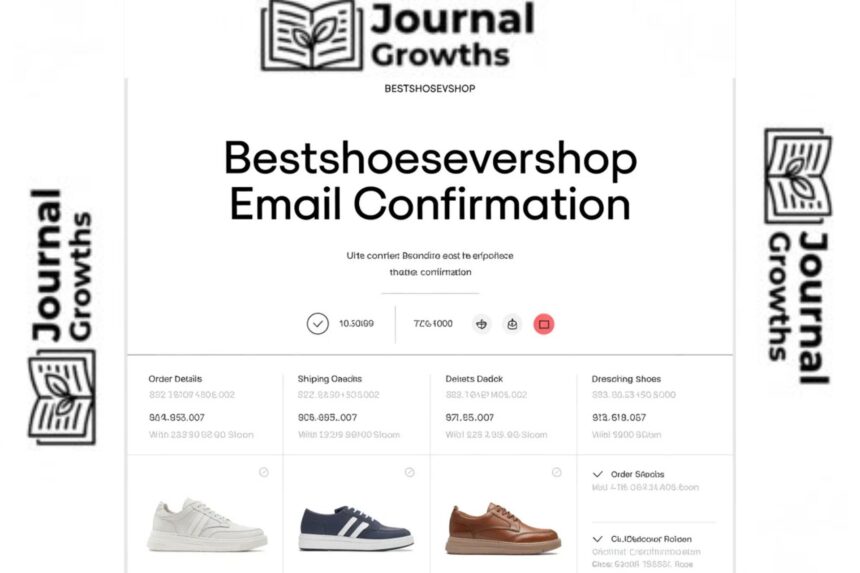
The “Bestshoesevershop” email usually arrives looking surprisingly official. It might have a neat little table listing a pair of high-end sneakers or boots, a “Total Amount” that’s high enough to make you worry (usually $150–$400), and a big, shiny button that says “View Your Order“ or “Contact Support to Cancel.”
Why This Specific Email is Popping Up Everywhere
Scammers love generic-sounding names. “Bestshoesevershop” sounds just plausible enough to be a real Shopify store or a small boutique you might have browsed months ago. By sending out thousands of these emails, the bad guys are playing a numbers game. They only need a small percentage of people to freak out and click that “Cancel” link to make their “work” profitable.
What Does a Typical “Bestshoesevershop Email Confirmation Look Like?
Usually, it’s a standard HTML template. It often includes:
-
A fake Order ID (e.g., #BSS-99210).
-
A “shipped to” address that isn’t yours (designed to make you think your account was hacked).
-
A sense of extreme urgency—implying the “charge” has already been processed.
Is Bestshoesevershop a Real Store?
The short answer? Probably not. When you search for “Bestshoesevershop.com,” you’ll often find that the site is either non-existent, a parked domain, or a very poorly constructed “shell” site that was created a few days ago.
Checking the Digital Footprint
Real shoe retailers—think Zappos or even a local boutique—have a social media presence, customer reviews on third-party sites like Trustpilot, and a history. “Bestshoesevershop” usually has the digital footprint of a ghost. If a “shop” only exists in your inbox and nowhere else on the internet, that’s not a shop; it’s a trap.
Red Flags: The Signs of a “Ghost” Retailer
-
No Contact Info: Look for a physical address or a working phone number on their site (if one even exists).
-
Recent Domain Registration: Scammers buy domains in bulk, use them for a month, and then burn them.
-
Too Good To Be True: If the email shows you “won” a pair of limited-edition Yeezys for $20, your “scam-dar” should be screaming.
How to Spot a Fake Order Confirmation Email
Spotting a fake is an art form, but you don’t need to be a tech genius to do it. You just need to be a little bit cynical.
The “Urgency” Trap: Why They Want You to Panic
Scammers are essentially psychological hackers. They know that if you’re calm, you’ll notice the typos. If you’re panicked (“I just lost $300!”), you’ll click the link to stop the charge. Never act while you are in a state of “digital fight-or-flight.” ### Analyzing the Sender’s Address (The Second-to-Last-Dot Rule) Don’t just look at the name “Bestshoesevershop.” Click or tap on the sender’s name to see the actual email address.
A professional company will (almost) never send an order confirmation from a generic @gmail or @outlook account.
Hovering Before You Leap: Checking Hyperlinks
On a computer, hover your mouse over any button or link in the email without clicking. Look at the bottom corner of your browser. If the link says it’s going to bestshoesevershop.com but the preview shows some weird string of numbers or a different domain entirely, run the other way.
Why Scammers Use the “Order Confirmation” Tactic
Why go through all this trouble just for a fake shoe order? Because it opens two very lucrative doors for the scammer.
Phishing for Credentials
When you click “Cancel Order,” you’re often taken to a fake login page that looks like PayPal or a bank. You enter your username and password to “verify” your identity, and just like that, the scammer has the keys to your actual money.
The “Refund Scam” Maneuver
Sometimes, the email includes a phone number. If you call it, a “representative” will tell you they can refund your money, but they need to “remote into your computer” or have you buy gift cards to “verify the account.” Legitimate companies will never ask you to buy a gift card to get a refund.
Step-by-Step: What to Do If You Receive This Email
If the “Bestshoesevershop” email is sitting in your inbox right now, follow these steps:
Step 1: Don’t Click Anything
No “Unsubscribe,” no “Cancel Order,” and definitely no attachments. Clicking any of these can signal to the scammer that your email address is “active,” leading to even more spam.
Step 2: Check Your Financial Statements Directly
Instead of trusting the email, go to the source. Log into your bank or credit card app through your official bookmark or app—not through a link in the email. If you don’t see a pending charge for the amount mentioned, the email is 100% fake.
Step 3: Report and Block
Mark the email as “Spam” or “Phishing” in your email client (Gmail, Outlook, etc.). This helps their algorithms catch the scam before it reaches someone else’s inbox.
What If You Already Clicked the Link?
Don’t beat yourself up; these guys are professionals. If you entered any info:
-
Change your passwords immediately for your email and banking accounts.
-
Enable Two-Factor Authentication (2FA) everywhere you can.
-
Contact your bank if you gave out credit card info so they can issue you a new card.
Conclusion: Staying One Step Ahead of the Bots
The Bestshoesevershop Email Confirmation is just one wave in a massive ocean of digital noise. By staying skeptical, checking the sender’s address, and never clicking in a state of panic, you can keep your data and your wallet safe. Remember: if you didn’t buy the shoes, the email is the one that belongs in the trash.
Frequently Asked Questions (FAQs)
1. I received an email from Bestshoesevershop Email Confirmation. Am I being charged?
Most likely, no. These are usually phishing emails designed to make you panic and click a malicious link. Check your bank statement directly (outside of the email) to be sure.
2. Why did I get this email if I’ve never visited their site?
Scammers buy lists of email addresses from data breaches. They send these “order confirmations” to thousands of people at once, hoping a few will be tricked.
3. Is it safe to click “Unsubscribe” in the Bestshoesevershop Email Confirmation?
No. Clicking “Unsubscribe” in a scam email confirms to the sender that your email is active and monitored, which will lead to more spam. Just mark it as spam and delete it.
4. The email has my correct home address. Does that mean it’s real?
Not necessarily. Your address is often public record or available in leaked databases. Scammers include it to add a layer of “legitimacy” to the scare tactic.
5. What should I do if my bank actually shows a charge from them?
If there is a real charge you didn’t authorize, contact your bank’s fraud department immediately to dispute the transaction and freeze your card.
Would you like me to help you draft a formal report to your email provider or bank regarding this suspicious activity?